Browser authentication flow
Loculus uses Keycloak as its OpenID Connect (OIDC) provider. Keycloak authenticates the user, while the Loculus website (Astro server) starts the login transaction, validates the response and establishes the website session.
This page describes browser login. Authentication via the API follows a separate flow.
The flow uses the standard OIDC authorization-code flow and established protections described in the OAuth 2.0 Security Best Current Practice. State, nonce and PKCE bind different parts of the same login attempt.
Loculus stores pending login transactions in an encrypted cookie so Astro replicas can validate callbacks without a shared transaction database. Each transaction is valid for one hour; the cookie holds at most three transactions within a byte-size budget. These are implementation choices; OIDC does not prescribe the storage mechanism or these limits.
Components and responsibilities
Section titled “Components and responsibilities”- Browser: follows redirects, displays the login page and stores cookies sent by the website.
- Astro server: starts the login transaction, exchanges the authorization code for tokens, validates the login response and manages the website session.
- Keycloak: authenticates the user, issues tokens and controls their lifetimes and renewal rules.
- Loculus backend: validates access tokens presented with API requests and checks whether the user may perform the requested action.
Flow terminology
Section titled “Flow terminology”Login initiation
Section titled “Login initiation”- Login transaction: one pending login attempt that Astro creates at
/auth/login. Astro saves its state, nonce, PKCE code verifier, return destination and expiry in an encrypted,HttpOnlytransaction cookie. In the second part of the login, Astro processes the callback by retrieving and removing the matching transaction from the cookie. The cookie holds up to three pending login transactions, each valid for 60 minutes. Starting another login discards older transactions if necessary to stay within the count or byte-size limit. - Return destination (
returnTo): the website URL the browser supplies to/auth/loginfor use after successful login. Astro checks that it has the same origin as the website, saves it in the transaction cookie and later redirects the browser there. It is not the callback URL sent to Keycloak. - State: a random value Astro generates for each login attempt and stores as the transaction’s key in the cookie. Astro includes it in the authorization URL that the browser follows to Keycloak. Keycloak returns it in the callback URL; Astro uses it to find the matching transaction in the browser’s cookie, binding the callback to that browser’s login attempt and protecting against login CSRF.
- Nonce: a random value Astro generates and saves in the transaction cookie. Astro also includes it in the authorization URL delivered to Keycloak by the browser. Keycloak places that nonce in the signed ID token returned directly to Astro during the token exchange. Astro compares it with the saved nonce to check that the ID token belongs to this login attempt.
- PKCE (Proof Key for Code Exchange): binds the authorization code to a secret created for the login attempt. It uses two related values:
- Code verifier: a random secret Astro generates and saves in the encrypted transaction cookie. At the callback, Astro retrieves it and sends it directly to Keycloak’s token endpoint with the authorization code. It is not included in the authorization URL.
- Code challenge: a value Astro derives from the code verifier using
S256(SHA-256, encoded with base64url). Astro includes it in the authorization URL. Keycloak associates it with the authorization code and checks the supplied verifier against it during the token exchange. An intercepted authorization code alone is therefore insufficient to obtain tokens.
- Transaction cookie (
oidc_transactions): an encrypted,HttpOnlycookie Astro sets before redirecting to Keycloak. The browser stores it and sends it back to the website with the callback; Astro decrypts it to recover the pending login details. It contains no access or refresh tokens and does not establish a signed-in session.
Callback and token exchange
Section titled “Callback and token exchange”- Authorization code: a short-lived, single-use value that lets Astro obtain tokens after the user authenticates with Keycloak. Keycloak redirects the browser to
/auth/callback?code=...&state=...on the Loculus website. The browser follows that URL, delivering the authorization code to Astro. Astro then sends the authorization code and saved PKCE code verifier directly to Keycloak’s token endpoint in a server-to-server request. Keycloak validates both and returns the tokens directly to Astro. The browser carries the authorization code between the two servers; the authorization code itself does not grant access to the Loculus API. - Callback: the browser’s request to the website’s
/auth/callbackendpoint after following Keycloak’s redirect. It carries the authorization code andstatein the URL, and the transaction cookie in the request headers. Astro processes these on the server. - ID token: Keycloak’s signed statement identifying the authenticated user, returned directly to Astro during the authorization-code exchange. Astro validates it, including the nonce against the saved transaction, before accepting the login. Astro does not put the ID token in the website session cookies or use it for backend API requests.
- Access token: a token Keycloak returns to Astro during the authorization-code exchange. Astro sets it in the browser’s
access_tokencookie. The browser sends that cookie back to the website; Astro also supplies the access token to some browser components for direct API calls. Protected API requests carry it in theAuthorization: Bearerheader, and the receiving API validates it and enforces access permissions. - Refresh token: a token Keycloak returns to Astro alongside the access token. Astro sets it in the browser’s
refresh_tokencookie, which the browser sends back to the website. When the access token expires, Astro submits the refresh token directly to Keycloak to request new tokens. Keycloak decides whether renewal is allowed; the refresh token is not used to authorize requests to the Loculus backend.
Website session
Section titled “Website session”- Website session cookies (
access_tokenandrefresh_token): two separateHttpOnlycookies Astro sets throughSet-Cookieresponse headers after a successful login. The browser stores them and sends them with subsequent matching requests to the website, where Astro uses the tokens to establish the request’s authenticated context or request a refresh. These are distinct from both the transaction cookie and Keycloak’s own sign-in cookies.
Login flow
Section titled “Login flow”Keycloak allows only registered callback destinations. Production deployments use the deployed website’s callback; previews and local development can also allow http://localhost:3000/auth/callback through the opt-in allowLocalhostAuthRedirects chart setting. See the upgrade guide’s local development settings, including the manual steps for existing realms.
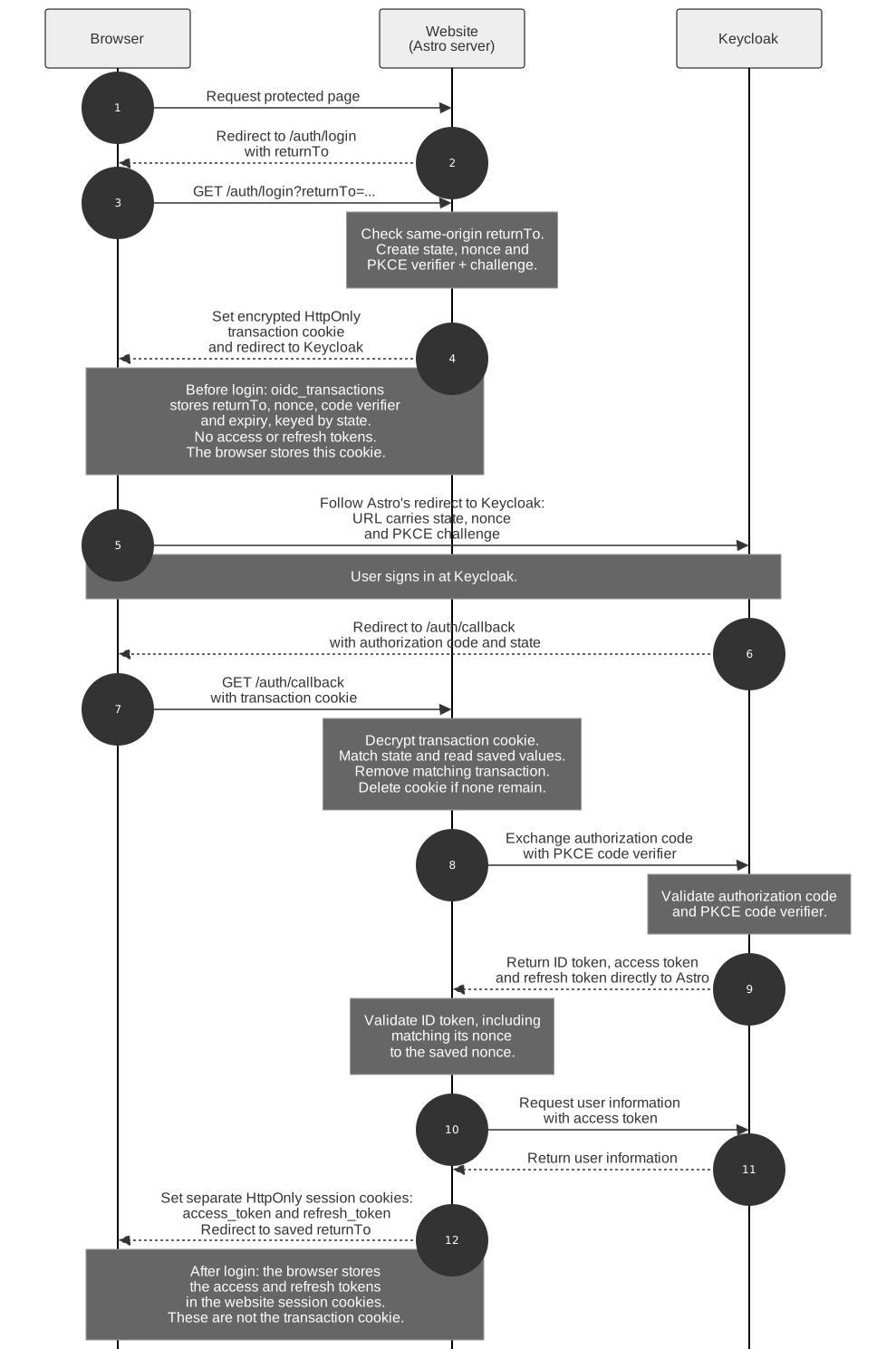
Open the diagram at full size.
The diagram starts with a logged-out visit to a protected page, which redirects the browser to /auth/login. Clicking a login link goes directly to that endpoint.
Astro includes state, nonce and the PKCE challenge in the authorization URL it redirects the browser to. When the browser follows that redirect, it delivers these values to Keycloak before the user signs in. Keycloak later includes the same nonce in the signed ID token returned to Astro during the code exchange; Astro checks it against the nonce saved in the transaction cookie.
After the user signs in, Keycloak returns an authorization code to the fixed /auth/callback endpoint on the Loculus website. Astro processes that callback on the server before the final page is rendered.
When /auth/login receives the requested destination as returnTo, it checks that the destination has the same origin as the website. Astro then saves that destination in the encrypted transaction cookie stored by the browser, alongside the nonce, PKCE verifier and expiry, keyed by state. The browser sends the cookie back to Astro with the callback; Astro decrypts it and reads the saved destination before removing the matching transaction. After a successful callback, the website redirects the user to that destination. This prevents a crafted login link from sending the user to an external site after login.
Keycloak returns tokens directly to Astro in the server-to-server authorization-code exchange. After validating the response and retrieving the user’s information, Astro sends Set-Cookie headers to the browser for the separate access_token and refresh_token session cookies. The browser stores them and sends them with subsequent matching requests to the website. The transaction cookie does not turn into a session cookie; Astro removes the completed transaction and deletes that cookie if no pending transactions remain.
What Keycloak returns
Section titled “What Keycloak returns”Browser callback
Section titled “Browser callback”The successful redirect to /auth/callback carries code (the authorization code) and the original state as query parameters. Depending on the Keycloak version and client configuration, it can also include:
iss(issuer): the Keycloak realm URL, for examplehttps://authentication.example.org/realms/loculus. This response parameter is defined in RFC 9207.session_state: a value associated with the Keycloak session. It is distinct from thestateAstro generates for the login transaction.
The access, refresh and ID tokens are not sent in this callback URL.
Token response and ID-token claims
Section titled “Token response and ID-token claims”Astro sends the authorization code and code_verifier to Keycloak’s token endpoint in an HTTPS POST. Keycloak responds directly to Astro with JSON containing id_token, access_token, refresh_token, token_type (normally Bearer) and expiry metadata such as expires_in. Additional fields depend on realm configuration. Loculus currently requires both access and refresh tokens. See OIDC’s token response.
The ID token is a signed JSON Web Token (JWT). Its claims include:
| Claim | Meaning |
|---|---|
iss |
Issuer: the Keycloak realm URL. |
sub |
Subject: the user’s identifier within that issuer, not their username or email. |
aud |
Audience: the intended client, here backend-client. |
exp / iat |
Expiry and issue times, in Unix seconds. |
nonce |
The value Astro sent for this login transaction. |
Claims such as preferred_username, name and email depend on scopes and claim mappings. Astro also requests profile information from Keycloak’s UserInfo endpoint using the access token. ID-token validation checks issuer, audience, expiry, signature and the expected nonce; decoding a JWT alone does not validate it. See OIDC ID-token validation.
How the tokens reach the browser and APIs
Section titled “How the tokens reach the browser and APIs”Astro sends the access and refresh tokens to the browser in separate Set-Cookie response headers, not in the redirect URL. Both cookies use HttpOnly, SameSite=Lax, Path=/ and, unless insecureCookies is enabled, Secure.
The browser sends matching cookies back to the website in the Cookie request header. Protected backend API calls instead use Authorization: Bearer <access_token>.
When the access token expires, Astro sends the refresh token to Keycloak’s token endpoint in a server-to-server refresh request (grant_type=refresh_token). The refresh token is not sent to the Loculus backend as an API credential. Keycloak controls whether the refresh succeeds.
Transaction cookie and timeouts
Section titled “Transaction cookie and timeouts”Astro stores the nonce, PKCE code verifier, returnTo and expiry, keyed by state, in an authenticated and encrypted HttpOnly cookie. Browser JavaScript cannot read this cookie. The cookie:
- is retained for up to one hour, allowing time for multi-step authentication and registration flows;
- is sent only over HTTPS, except in explicitly configured local development environments;
- uses
SameSite=Lax; - can hold up to three concurrent login transactions, subject to a 3,800-byte budget for the cookie name and encrypted value, leaving room for attributes below browser cookie-size limits.
New login attempts take priority over older pending transactions. Long return URLs may mean fewer than three transactions fit. If the newest transaction’s return URL cannot fit even on its own, Astro stores the same-origin /user destination instead. Login still completes, but the original search URL is not restored. This prevents abandoned long-URL attempts from blocking subsequent logins.
Astro removes the matching transaction from the cookie when processing its callback, leaving any other pending transactions in place.
The transaction cookie does not contain the user’s password, ID token, access token or refresh token. The ID token is validated during login but is not stored in either website session cookie.
The one-hour limit applies to the Loculus transaction. Keycloak or another authentication provider may enforce a shorter timeout for an individual login page or provider session. In that case, the provider may restart its part of the flow before the Loculus transaction expires.
Callback validation failures
Section titled “Callback validation failures”When the middleware cannot complete the transaction and there is no independently validated website session, /auth/callback redirects to a login-failure page without creating a session. If the user already has a valid website session, it redirects to /user instead; this avoids a misleading failure page when Back revisits a completed login. The rejected callback does not establish a new session. Removing the callback parameters from the visible URL also prevents an invalid authorization code and state from remaining in the address bar. Common causes include:
- the login was started more than one hour earlier;
- the callback was refreshed or reused after its transaction had already been consumed;
- a newer login attempt evicted this transaction to keep the cookie within its count or byte-size limit;
- the transaction cookie is missing or cannot be decrypted; or
- OIDC validation or retrieval of the user’s information failed.
Use Try logging in again on the failure page instead of refreshing or reopening a failed callback URL. This starts a new OIDC transaction and returns to the account page after a successful login. Server logs record a non-secret transaction identifier and one of the following reasons:
missing_or_expired_transactionprovider_errorvalidation_faileduserinfo_failed
The transaction identifier is a truncated hash of state; the raw state, authorization code and tokens are not logged.